Deployment patterns
The problem nobody mentions first
Section titled “The problem nobody mentions first”Blue-green deployment sounds like it solves everything until you have a database schema change that’s incompatible with the old code. Then you realize that deployment strategy and schema migration strategy are the same problem, and you can’t solve one without thinking about the other.
This is where most deployment pattern tutorials stop being useful. They describe the mechanics of switching traffic but not the hard part: what happens to the database in the ten minutes between old and new.
Rolling deployment
Section titled “Rolling deployment”The default in most platforms (Kubernetes, ECS, Heroku). New instances start, old instances stop, traffic shifts gradually.
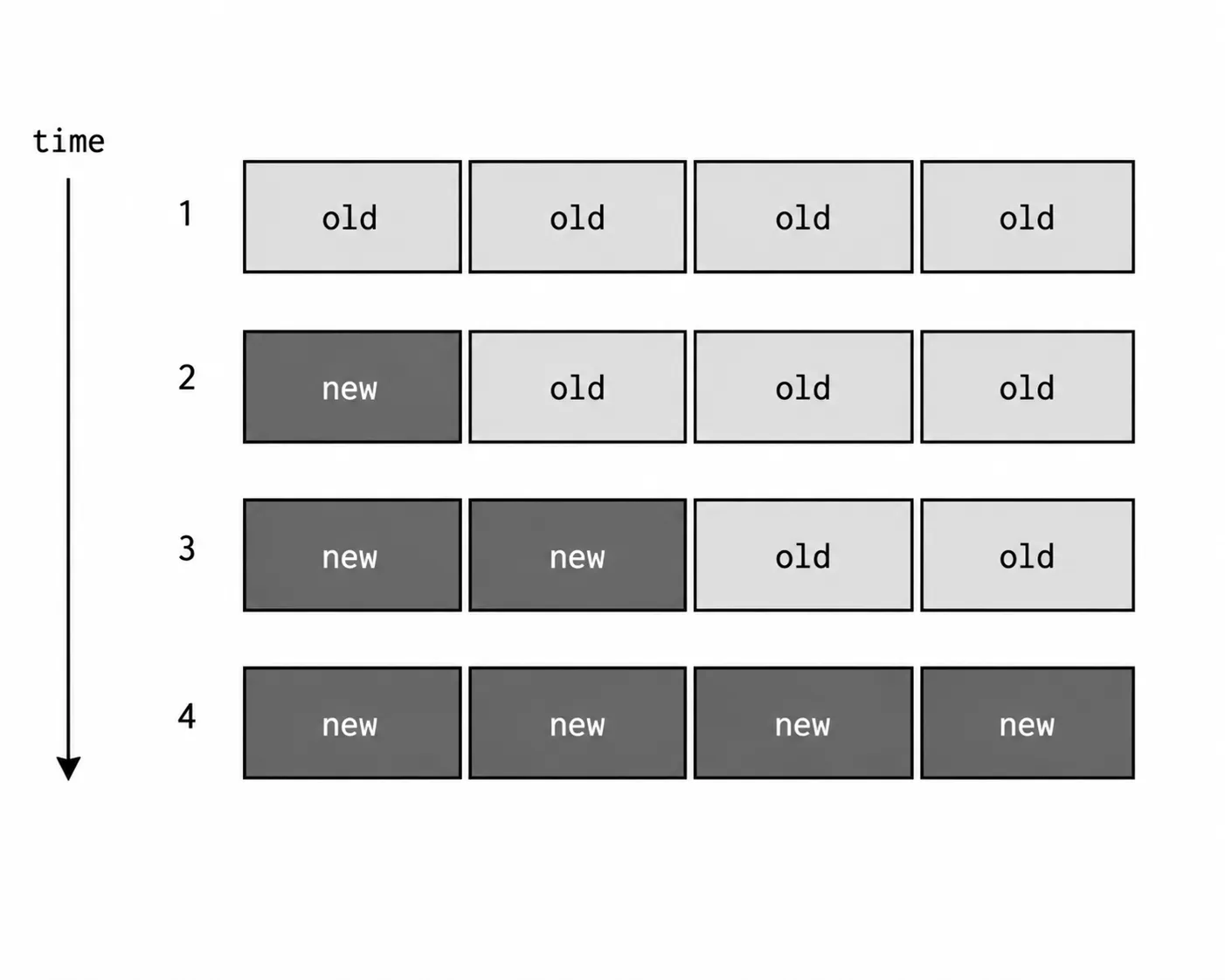
What it’s good for: stateless services where all versions of the code can coexist for the duration of the rollout.
Where it breaks: if the new code reads a database column that doesn’t exist yet, or if the old code can’t handle records the new code writes. During a rolling deployment, both versions are live simultaneously. Whatever state either version produces, the other version must be able to handle.
The standard pattern for safe rolling deployments with schema changes: make schema changes backward-compatible first, deploy them, verify, then deploy the application code change. Separately, after you’re confident the old code is gone, clean up the old schema if needed.
Phase 1: Add new column (nullable, old code ignores it) → deploy schemaPhase 2: Deploy new code that writes to new column (old code still works)Phase 3: Make column non-nullable once all rows are backfilled → deploy schemaPhase 4: Remove old column once old code is gone → deploy schemaFour separate deployments for one schema change. This is the actual cost of zero-downtime migrations, and skipping any phase is how you get a 3am incident.
Blue-green deployment
Section titled “Blue-green deployment”Run two identical production environments. Route 100% of traffic to one (blue). Deploy the new version to the other (green). Switch the load balancer. If something’s wrong, switch back.
What it’s good for: instant cutover, instant rollback, testing the exact production environment before anyone sees it.
The cost: you need two production environments. For stateless services, this is compute cost. For stateful services (databases), this is serious complexity — you can’t easily run two separate production databases and keep them in sync for a cutover, so usually only the application tier is blue-green, with a shared database.
The database problem: if blue-green requires the new application to run against the same database as the old one, you’re back to the same backward-compatibility requirement as rolling deployments. The switch is instant, but the database schema still has to support both application versions during the transition window.
The rollback story is better with blue-green: you switch back in seconds. With rolling deployments, rolling back means re-deploying the old version through all the rounds again — which takes as long as the original deployment.
Canary deployment
Section titled “Canary deployment”Route a small percentage of traffic to the new version, monitor, expand gradually, or roll back if metrics degrade.
What it’s good for: catching problems that only manifest under real production traffic patterns, at real scale, with real users. A canary that serves 5% of traffic for 30 minutes will surface any issue that affects more than roughly 1 in 20 requests.
What it requires: meaningful metrics that you actually monitor during the canary window. An error rate that goes from 0.01% to 2% on the canary is a clear signal. An error rate that was already 2% on baseline makes the canary signal useless.
The database problem: canary has the same backward-compatibility requirement. The canary version and the baseline version are simultaneously hitting the same database. Whatever the canary writes, baseline must be able to read, and vice versa.
Feature flags
Section titled “Feature flags”Feature flags decouple deploying code from releasing a feature. You ship the code to production but keep the feature off. When you’re ready to release, you flip a flag in your feature flag system — no new deployment required.
const isNewSearchEnabled = featureFlags.isEnabled("new-search", { userId });
if (isNewSearchEnabled) {  return await newSearchService.search(query);} else {  return await legacySearchService.search(query);}
This changes the risk profile of deployments. The deployment itself just ships code — the code is off, so it can’t affect users even if it has bugs. The release is a flag flip, which is instant and reversible. If the new search has a problem, you flip the flag off. No rollback, no re-deployment.
Feature flags also enable gradual rollouts without changing the load balancer: roll the flag to 1% of users, then 5%, then 20%, watching metrics at each stage. This is essentially a canary in the application layer instead of the infrastructure layer.
The maintenance problem: feature flags accumulate. A flag that was added two years ago for a “gradual rollout” that finished in week one is now permanent configuration that nobody understands. Teams I’ve worked with schedule quarterly flag cleanup and still fall behind. The discipline is treating flag creation as technical debt and scheduling flag removal the same day you create the flag.
Which to choose
Section titled “Which to choose”This is never a pure technical decision. The right pattern depends on rollback requirements, database change frequency, infrastructure cost tolerance, and team operational maturity.
Start with rolling if you have stateless services with backward-compatible schemas. It’s the default for a reason — it works well for the common case without requiring additional infrastructure.
Add feature flags when releasing features that need gradual rollout or instant kill-switch capability. This is probably the highest-value addition for most teams.
Consider blue-green when you need instant rollback capability and can afford the duplicate environment cost. Useful for high-risk releases where the rollback SLA is tight.
Canary makes sense when you have meaningful production metrics and enough traffic to make a percentage meaningful. If you serve 100 requests per day, 5% is 5 requests and the canary window tells you nothing.
Interview angles
Section titled “Interview angles”“What’s the database migration problem with zero-downtime deployments?” During any deployment where two code versions run simultaneously, both must be able to read and write the database correctly. Additive schema changes (adding nullable columns, adding tables) are safe. Breaking changes (removing columns, renaming columns, changing types) require multi-phase migrations: add the new schema, update the code, remove the old schema across separate deployments.
“What’s the difference between a canary and a feature flag?” A canary is infrastructure-level traffic routing — a percentage of requests go to the new application version. A feature flag is application-level — the same application version serves all traffic, but the feature is enabled or disabled per request based on a flag. Flags are more flexible (you can target specific users or segments) but require code to handle both states. Both solve the gradual rollout problem at different layers.
“When would you use blue-green over rolling?” Blue-green is better when you need instant rollback capability — the switch back is instantaneous versus re-deploying the old version through all the rolling stages. Rolling is simpler and cheaper (no duplicate environment). For most routine deployments, rolling is fine. For high-risk releases with tight rollback SLAs, blue-green is worth the cost.