Hooks from scratch
Before hooks existed
Section titled “Before hooks existed”From 2013 to 2019, React components that needed state or lifecycle methods had to be classes:
class Counter extends React.Component {  constructor(props) {    super(props);    this.state = { count: 0 };  }
  componentDidMount() {    document.title = `Count: ${this.state.count}`;  }
  componentDidUpdate() {    document.title = `Count: ${this.state.count}`;  }
  render() {    return (      <button onClick={() => this.setState({ count: this.state.count + 1 })}>        {this.state.count}      </button>    );  }}
Three problems with this:
-
Logic was split across lifecycle methods. The document title update lives in both
componentDidMountandcomponentDidUpdate. That’s the same logic in two places. In a real component with multiple concerns (data fetching, event listeners, analytics), you’d have five unrelated pieces of logic scattered across three lifecycle methods. -
Sharing logic between components was painful. If two components needed the same data-fetching logic, you had two options: Higher-Order Components (HOCs) that wrapped your component in another component, or render props that passed functions as children. Both worked but created deeply nested component trees (“wrapper hell”) that were hard to debug in React DevTools.
-
thiswas confusing. Binding event handlers, understanding whenthisrefers to the component instance vs the global scope, and passing callbacks correctly was a constant source of bugs. It was JavaScript’sthisproblem magnified by React’s rendering model.
useState: state without classes
Section titled “useState: state without classes”useState is the most straightforward hook. It gives a function component a piece of state and a way to update it.
function Counter() {  const [count, setCount] = useState(0);
  return <button onClick={() => setCount(count + 1)}>{count}</button>;}
The mental model: useState returns a pair. The current value, and a function to change it. When you call the setter, React schedules a re-render. On the next render, useState returns the new value.
The key thing I had to internalize: state doesn’t change during a render. When you call setCount(count + 1), count doesn’t update right away. The current render continues with the old value. The new value shows up on the next render. This is why:
function Confusing() {  const [count, setCount] = useState(0);
  function handleClick() {    setCount(count + 1);    setCount(count + 1); // still uses the old count!    console.log(count); // still 0, even after two setCount calls  }  // ...}
Both setCount calls use the same stale count. You get 1, not 2. If you need to update based on the previous value, use the function form: setCount(prev => prev + 1).
useEffect: synchronization, not lifecycle
Section titled “useEffect: synchronization, not lifecycle”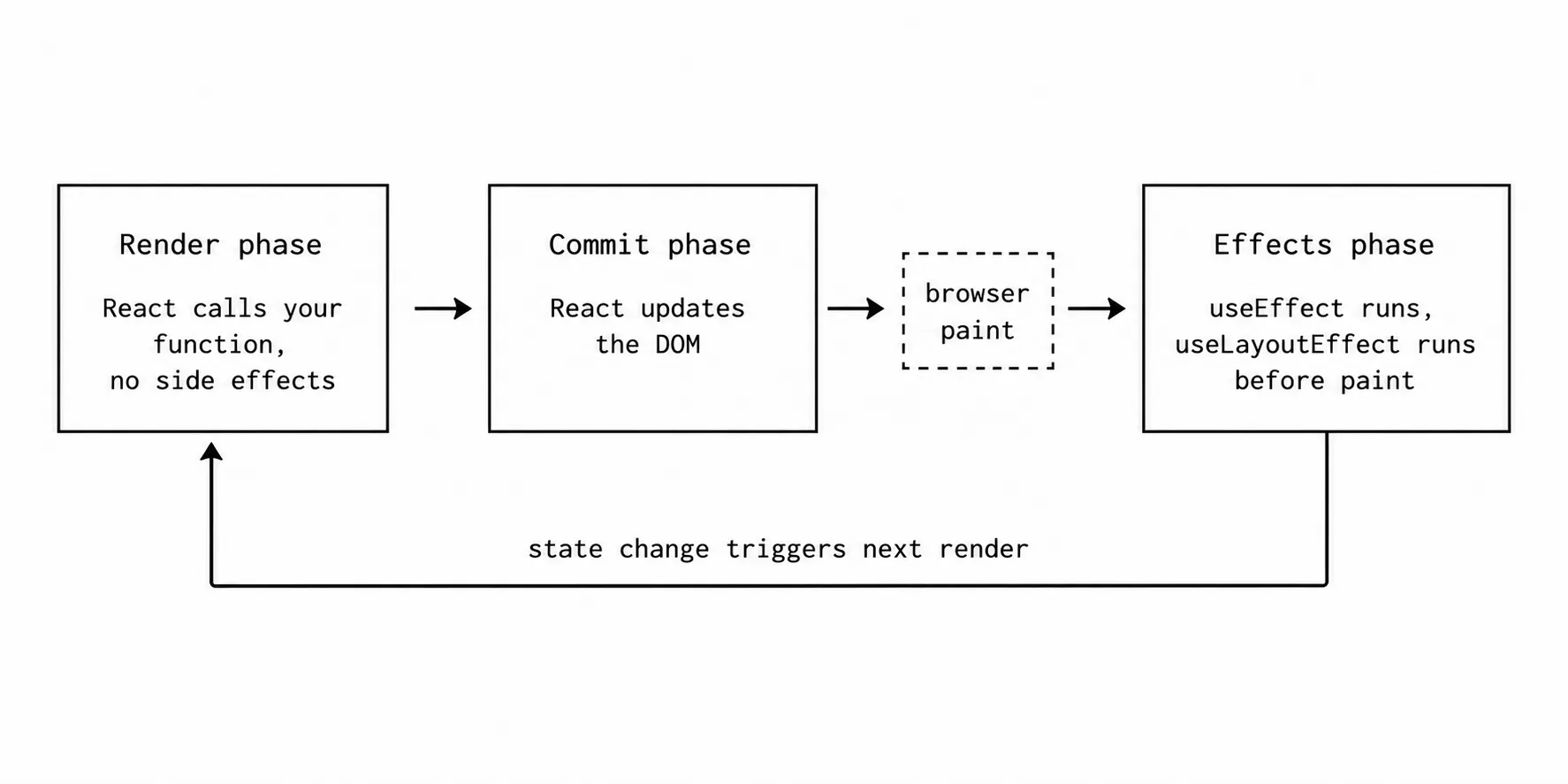
This is the most misunderstood hook, and I got it wrong for months before it clicked.
useEffect is NOT “componentDidMount + componentDidUpdate.” It’s a mechanism to synchronize your component with something outside of React’s rendering: a browser API, a WebSocket, a DOM measurement, a document title.
function ChatRoom({ roomId }) {  useEffect(() => {    const connection = createConnection(roomId);    connection.connect();
    return () => {      connection.disconnect();    };  }, [roomId]);  // ...}
The dependency array [roomId] says: “run this effect when roomId changes.” The return function is the cleanup: “before running the effect again, disconnect the old connection.” The whole thing reads as: “keep a connection open to the current room.”
The mistake I kept making: treating useEffect as a place to run code “after render” without thinking about what I’m synchronizing with. If the effect doesn’t synchronize with an external system, it probably doesn’t belong in useEffect.
Bad example (seen everywhere in codebases):
// Don't do thisuseEffect(() => { setFullName(firstName + " " + lastName);}, [firstName, lastName]);This is derived state. It doesn’t need an effect. Just compute it during render:
// Do this insteadconst fullName = firstName + " " + lastName;Effects are for external synchronization. If you’re using an effect to transform state into other state, you’re adding an unnecessary render cycle.
useRef: mutable value that doesn’t trigger renders
Section titled “useRef: mutable value that doesn’t trigger renders”useRef creates a persistent box. You can put anything in .current. Changing it doesn’t cause a re-render. It survives across renders.
Two common uses:
Accessing DOM elements:
function AutoFocusInput() {  const inputRef = useRef(null);
  useEffect(() => {    inputRef.current.focus(); // direct DOM access  }, []);
  return <input ref={inputRef} />;}
Storing values that shouldn’t trigger re-renders:
function Timer() {  const intervalRef = useRef(null);
  function start() {    intervalRef.current = setInterval(() => console.log("tick"), 1000);  }
  function stop() {    clearInterval(intervalRef.current);  }  // ...}
The interval ID needs to persist between renders (so stop can clear it), but changing it shouldn’t cause a re-render (there’s nothing visual about an interval ID). That’s exactly what useRef is for.
The mental model I use: useState is for values the UI depends on. useRef is for values the UI doesn’t care about but your logic needs to remember.
The rules of hooks (and why they exist)
Section titled “The rules of hooks (and why they exist)”Two rules:
- Only call hooks at the top level. Not inside conditions, loops, or nested functions.
- Only call hooks from React function components or custom hooks.
These seem arbitrary until you understand how React tracks hooks internally. React doesn’t use the hook names to identify them. It uses their call order. The first useState call in your component is always hook #1. The second is always hook #2.
If you put a hook inside an if statement, the call order changes between renders. React’s internal hook array gets out of sync, and everything breaks.
// Broken: hooks called in different order depending on conditionfunction Bad({ isLoggedIn }) { if (isLoggedIn) { const [name, setName] = useState(""); // sometimes hook #1, sometimes absent } const [count, setCount] = useState(0); // sometimes hook #1, sometimes hook #2}This is a design tradeoff. React could have used named hooks (like Vue’s composition API does with explicitly named refs), but they chose positional tracking because it’s simpler and requires no naming boilerplate.
Custom hooks: the real power
Section titled “Custom hooks: the real power”Custom hooks are where the “logic reuse” promise of hooks pays off. A custom hook is just a function that calls other hooks. Nothing magical.
function useWindowWidth() {  const [width, setWidth] = useState(window.innerWidth);
  useEffect(() => {    function handleResize() {      setWidth(window.innerWidth);    }    window.addEventListener("resize", handleResize);    return () => window.removeEventListener("resize", handleResize);  }, []);
  return width;}
// Used in any componentfunction Layout() {  const width = useWindowWidth();  return width > 768 ? <DesktopNav /> : <MobileNav />;}
Before hooks, sharing this logic required a HOC (withWindowWidth(Layout)) or render props (<WindowWidth>{width => ...}</WindowWidth>). Both wrapped your component in another component, which cluttered the tree and made debugging harder. Custom hooks share logic without changing the component hierarchy.
Try it: see hooks execute in real time
Section titled “Try it: see hooks execute in real time”This demo shows a tracked component. Click buttons and watch the timeline fill up with entries showing exactly when each hook phase fires: render, effects, cleanup, refs.
Things to notice:
- Render happens before effects. The component function runs first (producing the new UI), then effects run after React updates the DOM.
- Cleanup runs before the next effect. When count changes, the previous effect’s cleanup runs, then the new effect runs. This is how the ChatRoom connection example disconnects from the old room before connecting to the new one.
- Mount fires once. The effect with
[]dependencies runs once on mount and its cleanup runs once on unmount. Click Unmount to see it.
Interview angles
Section titled “Interview angles”The hooks questions that come up most:
“What’s the difference between useEffect and useLayoutEffect?” useEffect runs asynchronously after the browser paints. useLayoutEffect runs synchronously before the browser paints. Use useLayoutEffect only when you need to measure the DOM and update before the user sees a flash (tooltip positioning, scroll restoration).
“When does useEffect run?” After render, after the browser paints, when any value in the dependency array has changed (by reference equality). With an empty array, only on mount. With no array at all, after every render.
“Why not just use useEffect for everything?” Because effects add a render cycle. Derived state computed during render is faster and easier to reason about than state updated via effect. Effects are for external synchronization, not for state-to-state transformations.