Rendering and reconciliation
What “rendering” actually means
Section titled “What “rendering” actually means”This is the single biggest source of confusion in React. When React “renders” a component, it doesn’t touch the DOM. It calls your function and gets back a description of what the UI should look like.
function Greeting({ name }) { return <h1>Hello, {name}</h1>;}“Rendering” this component means calling Greeting({ name: "Alice" }) and getting back { type: 'h1', props: { children: 'Hello, Alice' } }. That’s it. No DOM nodes created. No pixels painted. Just a JavaScript object describing the intended output.
The actual DOM update is a separate step. React compares the new description with the previous one, figures out what changed, and applies the minimum number of DOM mutations. This second step is called “reconciliation” or “committing.”
So when you hear “this component re-rendered 50 times,” that doesn’t mean the DOM was updated 50 times. It means the function was called 50 times. If the output didn’t change, React skips the DOM update entirely.
The virtual DOM and diffing
Section titled “The virtual DOM and diffing”React keeps an in-memory representation of the UI called the virtual DOM. It’s a tree of JavaScript objects that mirrors the structure of the real DOM.
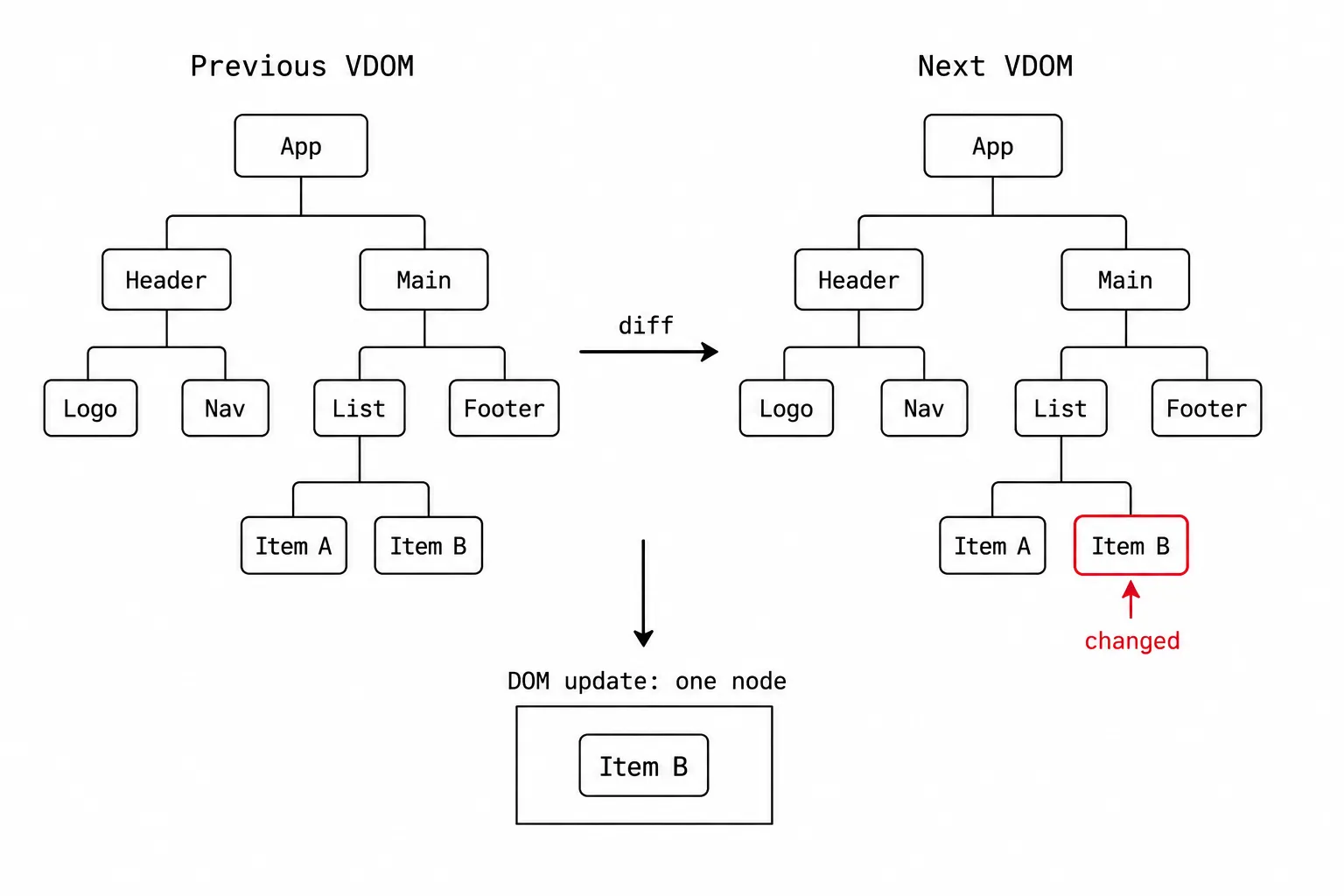
When state changes:
- React calls the affected component function (render phase)
- Gets a new virtual DOM tree
- Compares it with the previous tree (diffing)
- Calculates the minimum set of DOM operations needed (reconciliation)
- Applies those operations to the real DOM (commit phase)
The diffing algorithm makes two assumptions to stay fast (O(n) instead of O(n^3)):
Different element types produce different trees. If a <div> becomes a <span>, React doesn’t try to morph one into the other. It destroys the old tree and builds a new one. This is almost always the right call.
Keys identify stable elements in lists. When rendering a list, React uses key props to match elements between renders. Without keys, React pairs elements by position. With keys, it pairs them by identity. This is why using array index as a key breaks things when the list order changes:
// Broken with index keys: reorder items, and React reuses DOM nodes// in the wrong order because position 0 still maps to position 0{  items.map((item, index) => <Item key={index} data={item} />);}
// Fixed with stable keys: React tracks each item correctly{  items.map((item) => <Item key={item.id} data={item} />);}
The practical difference: with index keys, if you insert an item at the top of a list, every item below it “re-maps” to a different DOM node. Input state, focus, and animations all break. With stable keys, React knows which item is which and only inserts the new one.
When React re-renders
Section titled “When React re-renders”Three things trigger a re-render:
-
State change.
setState(oruseStatesetter) schedules a re-render of the component that owns that state. -
Parent re-renders. When a parent component re-renders, all of its children re-render too. This is the default behavior, and it’s the one that surprises people.
-
Context change. When a context value changes, every component consuming that context re-renders.
Number 2 is the important one. A child re-renders not because its props changed, but because its parent re-rendered. Even if the child’s props are identical to the previous render, React still calls the child’s function by default. It doesn’t check props equality unless you wrap the child in React.memo.
This sounds wasteful, but it’s usually fine. Calling a function and getting back a JavaScript object is cheap. The expensive part (DOM mutations) only happens if the output actually changed. React is optimized for the case where re-renders are frequent but DOM updates are rare.
Try it: watch what re-renders
Section titled “Try it: watch what re-renders”This component tree lets you trigger re-renders at different levels and see which components actually re-render. Each component shows its render count.
Things to notice:
- Click “Update parent state.” Every component re-renders, even ChildA which has its own state and received no props. That’s the “parent re-renders, children re-render” rule.
- Click ChildA’s “Local state” button. Only ChildA and its GrandchildA re-render. ChildB and GrandchildB are unaffected because they’re not in the re-render tree.
- The grandchildren always re-render when their parent does. GrandchildA has no props and no state, but it re-renders every time ChildA does. This is where
React.memowould help (but usually isn’t needed).
Why re-rendering is usually fine
Section titled “Why re-rendering is usually fine”New React developers often panic about render counts. “My component rendered 12 times! That must be slow!”
Usually, it’s not. Here’s why:
Rendering is just calling a function. A typical component function executes in microseconds. React can render thousands of components per frame without any visible performance impact.
React batches state updates. If you call setState three times in an event handler, React doesn’t render three times. It batches them into one render. Since React 18, this batching extends to async code (setTimeout, promises, fetch callbacks) too.
DOM updates are minimized. Even if 50 components re-render, React might only touch 2 DOM nodes. The diffing algorithm is what makes this fast. Rendering is cheap; DOM mutations are expensive; React does a lot of the former to minimize the latter.
The cases where re-rendering IS a problem:
- Components that do expensive computation during render (sorting large arrays, heavy regex, complex calculations). Fix:
useMemoto cache the result. - Lists with thousands of items that all re-render. Fix: virtualization (only render what’s visible).
- Components that update very frequently (animations, mouse tracking). Fix: keep the fast-updating state as local as possible so fewer components re-render.
Concurrent rendering (React 18+)
Section titled “Concurrent rendering (React 18+)”React 18 introduced concurrent rendering, which changes how rendering happens, not when. The key feature: React can start rendering, pause, do something more urgent (like handling a user click), and resume where it left off.
In practice, this shows up through two features:
startTransition marks a state update as non-urgent. React will start rendering it, but if the user types another character or clicks something, React interrupts the transition to handle the urgent event first.
function Search() {  const [query, setQuery] = useState("");  const [results, setResults] = useState([]);
  function handleChange(e) {    setQuery(e.target.value); // urgent: update the input immediately    startTransition(() => {      setResults(filterData(e.target.value)); // non-urgent: can be interrupted    });  }  // ...}
useDeferredValue is the hook version of the same idea. It gives you a “delayed” version of a value that React can update less urgently.
Concurrent rendering is not something you opt into globally. It activates automatically when you use these APIs. If you don’t use them, React 18 behaves identically to React 17 for rendering.
The interview version
Section titled “The interview version”If someone asks about React’s rendering model, here’s the structure:
- Rendering means calling component functions, not updating the DOM.
- Reconciliation diffs the old and new virtual DOM trees to find minimum DOM updates.
- Re-renders happen on state changes, parent re-renders, and context changes.
- Re-rendering is cheap. DOM mutation is expensive. React’s job is to minimize the latter.
React.memoopts a component out of parent-triggered re-renders (props equality check).- Keys in lists let React track element identity across renders, avoiding incorrect DOM reuse.
- Concurrent rendering (React 18) lets React pause and resume rendering to keep the UI responsive.
The nuance that separates a good answer: “re-rendering doesn’t mean the DOM updated.” Most candidates conflate the two.