How containers actually work
The mental model I had to unlearn
Section titled “The mental model I had to unlearn”For the first few months I used Docker, I thought containers were lightweight virtual machines. A VM starts an OS. A container starts some kind of mini-OS. That’s wrong, and the misunderstanding led to real production decisions I’d now make differently.
A container is a process (or group of processes) with restricted visibility. The Linux kernel is still the kernel. There’s no guest OS, no hypervisor, no hardware virtualization. What makes a container feel isolated is a set of kernel features that limit what that process can see and use.
On macOS, this distinction matters immediately: when you run Docker Desktop, your containers are running inside a Linux virtual machine because macOS doesn’t have Linux namespaces. docker stats shows you the container’s resource usage inside that VM. Understanding this explains a class of performance and networking surprises.
Namespaces: what the process can see
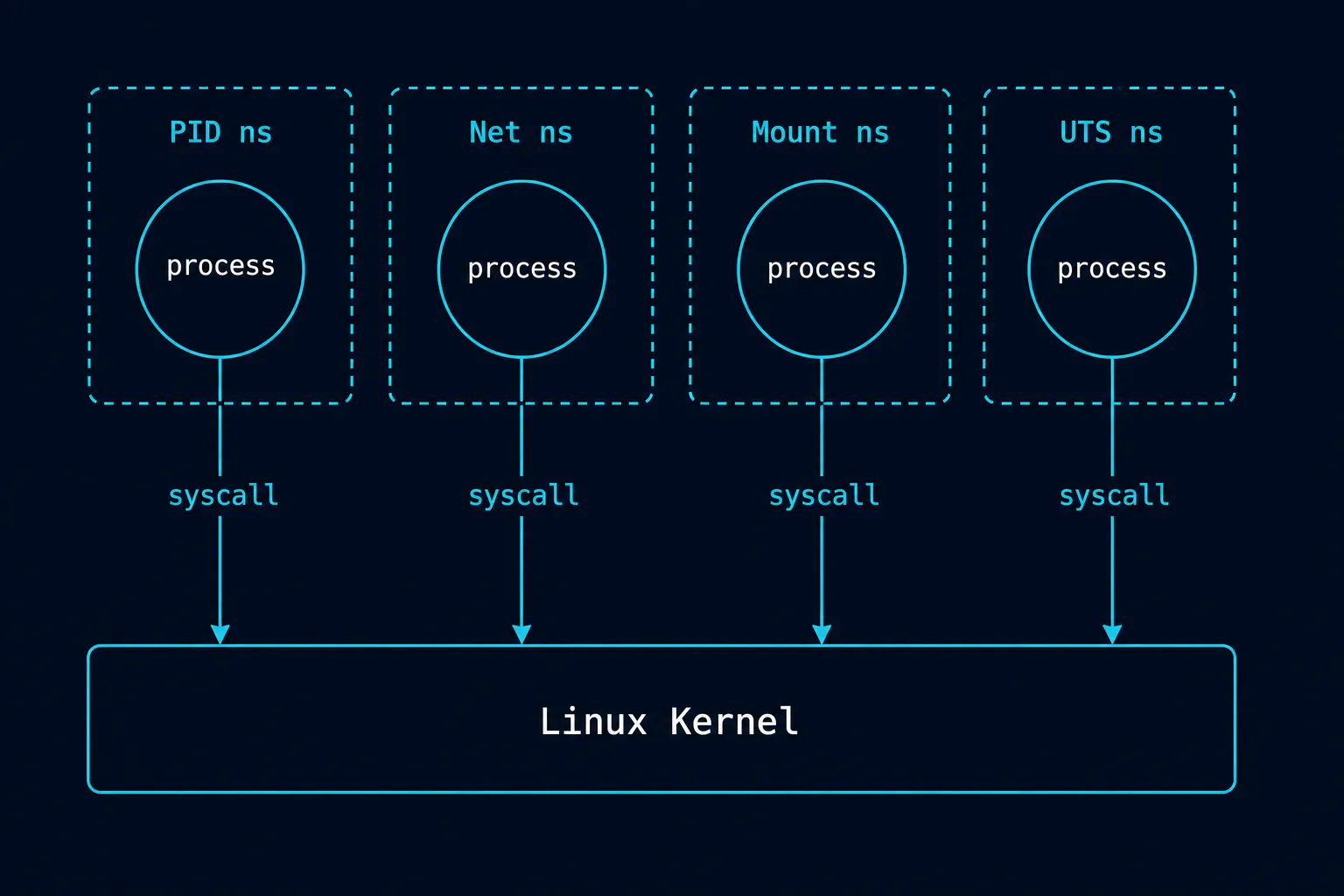
Section titled “Namespaces: what the process can see”The Linux kernel provides several namespace types. Docker uses most of them by default.
PID namespace — the container has its own process ID space. The first process in the container gets PID 1. It can’t see processes outside the namespace. From the host, you can see the container’s processes with their real PIDs; from inside the container, you see a clean tree starting at 1.
Network namespace — the container gets its own network stack: its own loopback interface, its own IP address, its own routing table. This is why two containers can both listen on port 8080 without conflict.
Mount namespace — the container sees its own filesystem tree. It can’t see the host filesystem (unless you explicitly mount a volume). This is where the layered image filesystem lives.
UTS namespace — the container has its own hostname. Running hostname inside a container returns the container ID, not the host machine name.
User namespace — the container can run as UID 0 (root) inside the namespace while mapping to an unprivileged user on the host. This is how rootless containers work.
What’s not isolated by default: the kernel itself, the system time, and certain /proc and /sys entries. This is why container “isolation” is not a security boundary in the way a VM is. A process that can exploit a kernel vulnerability can potentially escape its namespace. Containers reduce the attack surface but don’t eliminate it.
cgroups: what the process can use
Section titled “cgroups: what the process can use”Namespaces control visibility. Control groups (cgroups) control resource consumption. When you run:
docker run --memory 512m --cpus 1.5 my-serviceDocker creates a cgroup that limits the container’s memory to 512MB and CPU to 1.5 cores. The kernel enforces this at the process level, not through the container runtime.
This has a practical consequence that catches people out: a JVM inside a container doesn’t respect cgroup limits by default in older versions. The JVM reads available memory from /proc/meminfo, which shows the host’s total RAM. It allocates a heap based on that number, promptly exceeds the cgroup limit, and the kernel kills the container with OOMKilled. Java 11+ reads cgroup limits correctly. If you’re on Java 8, you need -XX:+UseContainerSupport or explicit heap flags.
# check what killed a containerdocker inspect my-container | grep OOMKilledThe same applies to any runtime that probes system resources rather than reading the cgroup directly. Node.js reads /proc/meminfo if --max-old-space-size isn’t set. On a host with 64GB of RAM, a Node container with a 512MB limit will have V8 try to use several gigabytes before the kernel ends it.
The layer filesystem
Section titled “The layer filesystem”A Docker image is not a flat filesystem. It’s a stack of read-only layers, each representing one instruction in the Dockerfile. When you run a container, Docker adds a thin writable layer on top.
FROM node:24-alpine # base layer — cached, shared across imagesWORKDIR /app # creates the directoryCOPY package*.json ./ # new layer: the package filesRUN npm ci # new layer: 200MB of node_modulesCOPY . . # new layer: your sourceCMD ["node", "server.js"]The copy-on-write strategy: when a running container writes a file that exists in a lower read-only layer, the kernel copies that file up to the writable layer and modifies it there. The original layer is untouched.
Why layer order matters for build speed. Docker caches layers. If a layer’s inputs haven’t changed, it reuses the cached result. The COPY . . step copies your source code, which changes constantly. If you put that before RUN npm ci, every source change invalidates the npm install. The right order: copy only what changes rarely first, then install dependencies, then copy source.
Why image size matters. Every layer adds to the image size. Installing build tools, then removing them in a later RUN step, doesn’t help — the tools still exist in the earlier layer. Multi-stage builds solve this:
# Build stageFROM node:24 AS builderWORKDIR /appCOPY package*.json ./RUN npm ciCOPY . .RUN npm run build
# Production stage — starts fresh, copies only the built outputFROM node:24-alpineWORKDIR /appCOPY --from=builder /app/dist ./distCOPY --from=builder /app/node_modules ./node_modulesCMD ["node", "dist/server.js"]
The final image doesn’t contain the build tools, source files, or test dependencies. Only what the running process actually needs.
What isolation actually means
Section titled “What isolation actually means”Containers give you: filesystem isolation, network isolation, process isolation, resource limits, and a reproducible runtime environment. They don’t give you: hardware-level isolation, kernel isolation, or a security boundary equivalent to a VM.
The practical tradeoffs:
- Containers start in milliseconds. VMs start in seconds to minutes.
- Containers share the host kernel. VMs run their own. A container vulnerability can affect the host. A VM vulnerability is contained to the VM.
- Containers are cheap enough to run one per service component. VMs are expensive enough that you run multiple services per VM.
- The container image captures everything except the kernel. A container that passes tests on your machine will behave identically in production, because the environment is the same. A VM still has OS configuration drift.
Interview angles
Section titled “Interview angles”“What’s the difference between a container and a virtual machine?” A container is a process with Linux namespace and cgroup isolation — it shares the host kernel. A VM runs a guest OS on a hypervisor with hardware-level isolation. Containers start faster and use less memory; VMs provide stronger isolation.
“Why did my container get OOMKilled?” The process inside the container exceeded the memory limit set in the cgroup. Common causes: the JVM, Node.js, or another runtime reading total host RAM from /proc/meminfo instead of the cgroup limit and allocating accordingly. Fix: set explicit heap limits, use a runtime version that reads cgroup limits, or increase the container’s memory allowance.
“What’s a multi-stage Docker build?” A Dockerfile that uses multiple FROM instructions. Each stage can use a different base image. The final stage only copies what it needs from earlier stages — build tools and intermediate artifacts are left behind. Produces a smaller, more secure production image.