Async patterns
The evolution
Section titled “The evolution”JavaScript’s async story has three chapters, each solving problems the previous one created:
- Callbacks (1995-present): pass a function that runs when the work is done
- Promises (ES2015): an object representing a future value, with chainable
.then - async/await (ES2017): syntactic sugar that makes Promises read like synchronous code
All three still work. You’ll see all three in production code. But for new code, async/await is almost always the right choice.
Callbacks and callback hell
Section titled “Callbacks and callback hell”The original async pattern. You pass a function to be called when the async work completes:
fs.readFile("config.json", (err, data) => { if (err) { console.error(err); return; } const config = JSON.parse(data); db.connect(config.dbUrl, (err, connection) => { if (err) { console.error(err); return; } connection.query("SELECT * FROM users", (err, users) => { if (err) { console.error(err); return; } // finally have the users... 3 levels deep }); });});This nesting is called “callback hell” or the “pyramid of doom.” Each async step adds another indentation level with duplicated error handling, and combining results from multiple operations becomes genuinely unmanageable.
The deeper problem: inversion of control. You hand your callback to someone else’s code and trust they’ll call it correctly (once, with the right arguments, at the right time). If the library has a bug and calls your callback twice, your code runs twice. You have no way to prevent it.
Promises
Section titled “Promises”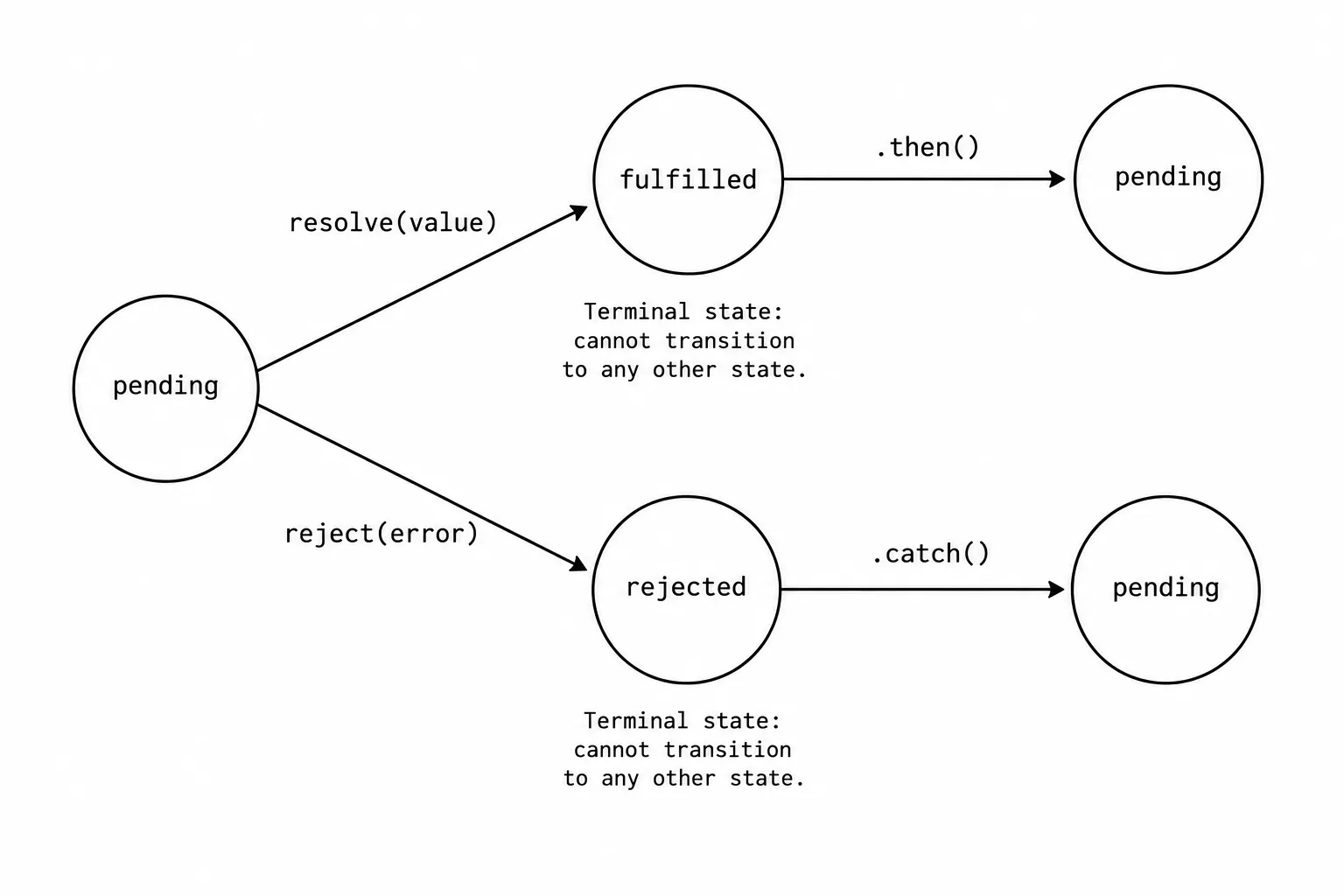
A Promise is an object that represents a value that might exist now, might exist later, or might never exist (if the operation fails).
const promise = fetch("/api/users");// promise is a Promise object, not the response
promise  .then((response) => response.json()) // runs when fetch resolves  .then((users) => console.log(users)) // runs when json() resolves  .catch((err) => console.error(err)); // runs if anything in the chain rejects
What Promises fixed:
- Chaining instead of nesting.
.thenreturns a new Promise, so steps are flat, not nested. - Centralized error handling. One
.catchat the end handles errors from any step. - Guaranteed single resolution. A Promise resolves or rejects once. Can’t be called twice.
- Composability.
Promise.all,Promise.race,Promise.allSettledlet you combine multiple async operations cleanly.
Promise states
Section titled “Promise states”A Promise is always in one of three states:
- Pending: the operation hasn’t completed yet
- Fulfilled: the operation completed successfully (has a value)
- Rejected: the operation failed (has a reason/error)
Once a Promise settles (fulfilled or rejected), it never changes state. Calling .then on an already-fulfilled Promise runs the callback immediately (well, as a microtask).
Error propagation
Section titled “Error propagation”Errors flow through .then chains until they hit a .catch. Any .then that throws or returns a rejected Promise skips all subsequent .then handlers and falls through to the next .catch.
After .catch handles the error, the chain continues normally. .catch itself returns a new fulfilled Promise (unless .catch itself throws).
Try it: watch Promises resolve
Section titled “Try it: watch Promises resolve”Step through different Promise patterns to see the resolution flow, error propagation, and how Promise.all coordinates concurrent operations.
Try it: Promise Execution Flow
Pick a pattern, then step through to see how promises resolve, chain, and propagate errors.
fetch("/api/user")
  .then(res => res.json())
  .then(user => console.log(user.name))
.catch(err => console.error(err));The “Error propagation” scenario is especially important. Notice how the second .then is skipped entirely after the throw. The chain resumes after .catch.
async/await
Section titled “async/await”async/await is syntax over Promises. An async function always returns a Promise. await pauses the function until the Promise resolves.
// Promise versionfunction getUser(id) {  return fetch(`/api/users/${id}`)    .then((res) => res.json())    .then((user) => {      return fetch(`/api/orders?userId=${user.id}`)        .then((res) => res.json())        .then((orders) => ({ ...user, orders }));    });}
// async/await version (same behavior, reads top-to-bottom)async function getUser(id) {  const res = await fetch(`/api/users/${id}`);  const user = await res.json();  const ordersRes = await fetch(`/api/orders?userId=${user.id}`);  const orders = await ordersRes.json();  return { ...user, orders };}
The async/await version reads like synchronous code. No nesting, no .then chains, no callbacks. Each await pauses the function, yields control to the event loop (other code can run), and resumes when the Promise resolves.
Error handling with try/catch
Section titled “Error handling with try/catch”async function getUser(id) { try { const res = await fetch(`/api/users/${id}`); if (!res.ok) throw new Error(`HTTP ${res.status}`); return await res.json(); } catch (err) { console.error("Failed to fetch user:", err); return null; }}try/catch with async/await is cleaner than .catch chains when you need different error handling at different points in the function.
The common mistake: sequential when you want parallel
Section titled “The common mistake: sequential when you want parallel”// SLOW: each await waits for the previous oneasync function getData() { const users = await fetch("/api/users").then((r) => r.json()); // 200ms const posts = await fetch("/api/posts").then((r) => r.json()); // 200ms const comments = await fetch("/api/comments").then((r) => r.json()); // 200ms return { users, posts, comments };}// Total: ~600ms (sequential)
// FAST: start all three, then wait for allasync function getData() { const [users, posts, comments] = await Promise.all([ fetch("/api/users").then((r) => r.json()), fetch("/api/posts").then((r) => r.json()), fetch("/api/comments").then((r) => r.json()), ]); return { users, posts, comments };}// Total: ~200ms (parallel, limited by the slowest)If the operations are independent (don’t depend on each other’s results), use Promise.all. If they’re sequential (the second needs the first’s result), use sequential await.
Promise combinators
Section titled “Promise combinators”Promise.all
Section titled “Promise.all”Waits for all promises to resolve. Rejects immediately if any one rejects.
const [a, b, c] = await Promise.all([fetchA(), fetchB(), fetchC()]);// If fetchB rejects, Promise.all rejects. fetchA and fetchC might still be running// but their results are discarded.Use when: you need ALL results and failure of any one means the whole operation failed.
Promise.allSettled
Section titled “Promise.allSettled”Waits for all promises to settle (resolve or reject). Never rejects itself.
const results = await Promise.allSettled([fetchA(), fetchB(), fetchC()]);// results: [// { status: "fulfilled", value: ... },// { status: "rejected", reason: Error },// { status: "fulfilled", value: ... },// ]Use when: you want results from whatever succeeded and don’t want one failure to lose everything.
Promise.race
Section titled “Promise.race”Resolves or rejects with the first promise to settle.
const result = await Promise.race([ fetch("/api/data"), new Promise((_, reject) => setTimeout(() => reject(new Error("timeout")), 5000)),]);Use when: timeout patterns, or when you want the fastest response from multiple sources.
Promise.any
Section titled “Promise.any”Resolves with the first promise to fulfill. Only rejects if ALL promises reject.
const fastest = await Promise.any([ fetch("https://cdn1.example.com/data"), fetch("https://cdn2.example.com/data"), fetch("https://cdn3.example.com/data"),]);// fastest is whichever CDN responded first successfullyUse when: you have multiple redundant sources and want the first successful one.
Patterns I use in production
Section titled “Patterns I use in production”Retry with exponential backoff
Section titled “Retry with exponential backoff”async function fetchWithRetry(url, maxRetries = 3) { for (let attempt = 0; attempt <= maxRetries; attempt++) { try { const res = await fetch(url); if (res.ok) return await res.json(); if (res.status < 500) throw new Error(`Client error: ${res.status}`); // Server error: retry } catch (err) { if (attempt === maxRetries) throw err; const delay = Math.min(1000 * 2 ** attempt, 10000); await new Promise((r) => setTimeout(r, delay)); } }}Cancellable fetch with AbortController
Section titled “Cancellable fetch with AbortController”function fetchWithTimeout(url, timeoutMs = 5000) { const controller = new AbortController(); const timeout = setTimeout(() => controller.abort(), timeoutMs);
return fetch(url, { signal: controller.signal }).finally(() => clearTimeout(timeout));}Sequential processing of an array
Section titled “Sequential processing of an array”// Process items one at a time (e.g., rate-limited API)async function processSequentially(items, fn) { const results = []; for (const item of items) { results.push(await fn(item)); } return results;}
// Process with a concurrency limitasync function processWithLimit(items, fn, limit = 5) { const results = []; const executing = new Set();
for (const item of items) { const promise = fn(item).then((result) => { executing.delete(promise); return result; }); executing.add(promise); results.push(promise);
if (executing.size >= limit) { await Promise.race(executing); } }
return Promise.all(results);}Interview angles
Section titled “Interview angles”“Explain async/await vs Promises.” async/await is syntactic sugar over Promises. An async function returns a Promise. await pauses execution until the Promise resolves, but doesn’t block the thread (the event loop continues running other code). Under the hood, the engine transforms async/await into a Promise chain. The advantage is readability: sequential async code reads like synchronous code instead of nested .then chains.
“How does the event loop handle Promises?” Promise .then/.catch/.finally callbacks go into the microtask queue. The event loop processes ALL microtasks before any macrotask (setTimeout, I/O). This means Promise callbacks have higher priority than setTimeout callbacks, even with setTimeout(..., 0).
“What’s the difference between Promise.all and Promise.allSettled?” Promise.all short-circuits on the first rejection. Promise.allSettled waits for everything and gives you the status of each. Use .all when all results are needed and any failure is fatal. Use .allSettled when partial results are useful.
Scenario: “Multiple messages arrive simultaneously in a chat app. How do you handle this?” Use Promise.allSettled to process messages concurrently without one failure blocking others. Batch DOM updates using React’s state batching or requestAnimationFrame. For ordering, use a queue that processes messages sequentially if order matters, or Promise.all with an index if you just need to maintain display order.