How JavaScript works
One thread, one stack
Section titled “One thread, one stack”JavaScript has one thread. One call stack. One piece of code executing at any given moment. This is the single most important thing to understand about the language, because every other concept (callbacks, promises, async/await, the event loop) exists because of this constraint.
When you call a function, it goes on the call stack. When that function calls another function, the new one goes on top. When a function returns, it comes off the stack. If the stack is busy, nothing else runs. A function that takes 5 seconds blocks everything for 5 seconds: no click handlers fire, no animations run, the page freezes.
function multiply(a, b) {  return a * b;}function square(n) {  return multiply(n, n);}function printSquare(n) {  console.log(square(n));}
printSquare(4);// Stack: printSquare → square → multiply → (returns 16) → square returns → log(16) → printSquare returns
The stack is LIFO (last in, first out). The last function called is the first one to return. If you’ve seen a stack trace in an error message, that’s literally the call stack at the moment the error happened, printed from top (where it threw) to bottom (where it started).
The problem with one thread
Section titled “The problem with one thread”If JavaScript can only do one thing at a time, how does a web app handle multiple things happening? A user clicks a button while an API call is in flight while a timer is counting down. None of that works if the thread is stuck waiting for the API response.
The answer: JavaScript doesn’t handle network requests. The browser does.
When you call fetch() or setTimeout(), JavaScript doesn’t sit there waiting. It hands the work to the browser’s Web APIs (or Node’s libuv for server-side). The host manages the operation and later makes its continuation eligible to run. The event loop picks it up when the call stack is empty. The implementation may use threads, kernel facilities, or other mechanisms; “a separate thread” is a useful model, not a guarantee.
The event loop
Section titled “The event loop”The event loop is the mechanism that coordinates the call stack, the callback queues, and the browser APIs. Its job is simple:
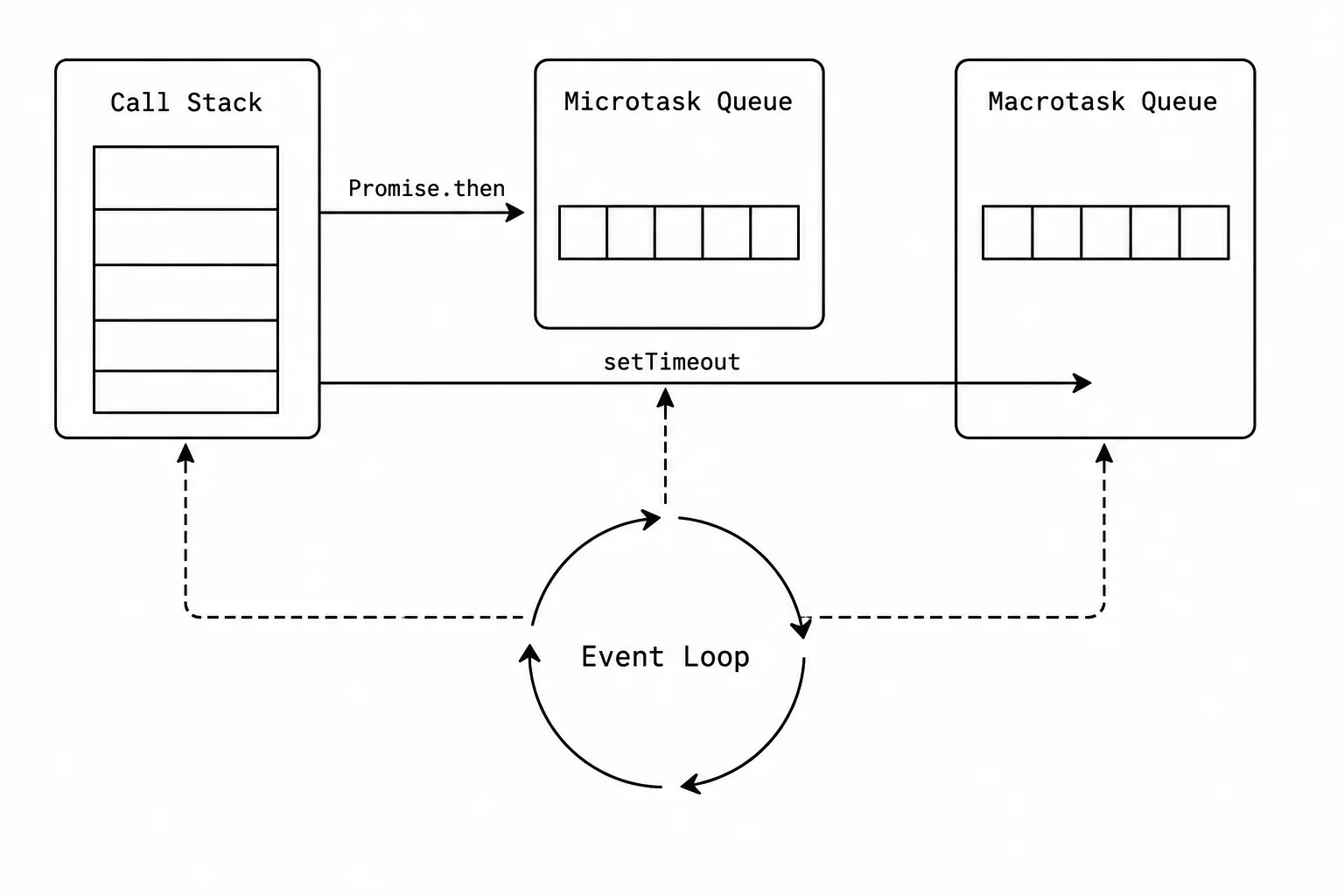
- Is the call stack empty?
- If yes, check the microtask queue. If there’s something there, push it onto the stack.
- If the microtask queue is empty, check the macrotask queue. Push the next item onto the stack.
- Repeat.
That’s it. The entire complexity of asynchronous JavaScript comes from this loop and the two queues.
Microtask queue
Section titled “Microtask queue”Microtasks are high-priority callbacks. Promise .then, .catch, .finally callbacks go here. queueMicrotask() puts things here directly. MutationObserver callbacks go here.
The critical rule: all microtasks run before any macrotask. If a microtask schedules another microtask, that runs too, before the event loop moves to the macrotask queue. This means you can starve the macrotask queue by creating an infinite chain of microtasks (don’t do this).
Macrotask queue
Section titled “Macrotask queue”Tasks are lower-priority callbacks such as setTimeout, setInterval, and many input events. requestAnimationFrame is scheduled by the browser’s rendering pipeline before a repaint, so it is better treated separately from a generic timer task.
After each macrotask completes, the event loop drains the entire microtask queue before picking up the next macrotask.
Try it: step through the event loop
Section titled “Try it: step through the event loop”This simulator lets you run code step by step and watch items move between the call stack, microtask queue, and macrotask queue. Start with “Basic order” to see the fundamental principle.
Try it: Event Loop Simulator
Pick a scenario, then step through tick by tick. Watch items move between the call stack, microtask queue, and macrotask queue.
console.log("1");
setTimeout(() => console.log("2"), 0);
Promise.resolve().then(() => console.log("3"));
console.log("4");The key takeaway from the “Basic order” scenario: setTimeout(() => ..., 0) does NOT run “immediately.” It runs after all synchronous code AND all microtasks finish. A Promise.resolve().then(...) runs before setTimeout(..., 0) even though the setTimeout was registered first.
=== vs == (type coercion)
Section titled “=== vs == (type coercion)”I once spent an hour debugging a filter that skipped zero-quantity items because quantity == "" returned true. That was the day I stopped using == in any codebase I controlled.
== does type coercion before comparing. === compares without coercion.
0 == ""; // true (both coerce to 0)0 === ""; // false (number vs string)null == undefined; // true (special case in the spec)null === undefined; // false (different types)false == 0; // true (false coerces to 0)false === 0; // false (boolean vs number)"" == false; // true (both coerce to 0)The coercion rules are documented in the spec but nobody memorizes them. The practical rule: always use === unless you’re intentionally checking null == undefined (which is the one case where == is arguably clearer than x === null || x === undefined).
In TypeScript with strict mode, the compiler flags most == comparisons as a lint warning. This whole category of bugs goes away.
let, const, var, and hoisting
Section titled “let, const, var, and hoisting”Three ways to declare variables, each with different scoping and hoisting behavior.
var is function-scoped and hoisted. The declaration is moved to the top of the function, but the assignment stays in place:
console.log(x); // undefined (not an error! var is hoisted)var x = 5;console.log(x); // 5
// What the engine actually sees:var x; // hoisted to topconsole.log(x); // undefinedx = 5;console.log(x); // 5
let is block-scoped with a Temporal Dead Zone (TDZ). The variable exists from the start of the block but can’t be accessed until the declaration:
console.log(y); // ReferenceError: Cannot access 'y' before initializationlet y = 5; // This is the TDZ boundaryThe TDZ exists to catch bugs. With var, accessing a variable before its assignment silently gives you undefined. With let, you get an error that tells you something is wrong.
const has the same scoping as let but can’t be reassigned:
const z = 5;z = 10; // TypeError: Assignment to constant variable
// But: const objects and arrays CAN be mutatedconst arr = [1, 2, 3];arr.push(4); // fine! The binding is constant, not the value
This trips people up. const means “this variable always points to the same thing.” It doesn’t mean the thing itself can’t change. For true immutability you need Object.freeze() (shallow) or a library.
What to use: const by default. let when you need to reassign. Never var in modern code.
Try it: step through hoisting and TDZ
Section titled “Try it: step through hoisting and TDZ”Try it: var vs let vs const
Pick a declaration type, then step through execution line by line. Watch how hoisting and the TDZ affect each variable.
console.log(x);var x = 10;console.log(x);Deep copy vs shallow copy
Section titled “Deep copy vs shallow copy”This comes up constantly in interview and in real bugs.
Shallow copy: copies the top-level properties. Nested objects are still references to the original.
const original = { name: "Alice", address: { city: "Portland" } };const shallow = { ...original };
shallow.name = "Bob"; // doesn't affect originalshallow.address.city = "Seattle"; // DOES affect original!// original.address.city is now "Seattle"
The spread operator (...) and Object.assign() both do shallow copies. The address property is a reference. Both objects point to the same address object in memory.
Deep copy: copies everything, including nested objects. Each level gets its own copy.
// Modern approach (works in all modern browsers and Node 17+)const deep = structuredClone(original);
// Old approachconst deep = JSON.parse(JSON.stringify(original));// Breaks on: Date objects (become strings), undefined values (dropped),// functions (dropped), circular references (throws)
structuredClone is the correct answer in 2024+. It handles Dates, RegExp, Maps, Sets, ArrayBuffers, and even circular references. JSON.parse(JSON.stringify(...)) is the pre-2022 hack that works for plain data but breaks on anything non-JSON-serializable.
Try it: reference vs shallow vs deep copy
Section titled “Try it: reference vs shallow vs deep copy”Reference vs. Shallow Copy vs. Deep Copy
Mutate the original object and observe which copies reflect the change. Green values are unchanged from the initial state; red values have been affected by a mutation.
No mutations yet. All four boxes show the same initial object. Click a "Mutate" button to see how each copy strategy responds differently.
?? vs ||
Section titled “?? vs ||”Both provide fallback values. The difference matters.
|| (logical OR): returns the right side if the left side is falsy. Falsy values: false, 0, "", null, undefined, NaN.
?? (nullish coalescing): returns the right side only if the left side is null or undefined. NOT for other falsy values.
const count = 0;console.log(count || 10); // 10  (0 is falsy, so it falls through)console.log(count ?? 10); // 0   (0 is not null/undefined, so it stays)
const name = "";console.log(name || "Anonymous"); // "Anonymous" (empty string is falsy)console.log(name ?? "Anonymous"); // ""           (empty string is not null)
Use ?? when 0, "", or false are valid values that you want to keep. Use || when you want to treat all falsy values as “missing.”
WeakMap and WeakSet
Section titled “WeakMap and WeakSet”Regular Maps and Sets hold strong references to their keys. If you add an object as a key to a Map and then delete all other references to that object, the Map’s reference keeps it alive in memory. It can’t be garbage collected.
WeakMap holds weak references. When nothing else references the key object, the garbage collector can reclaim it. The entry quietly disappears from the WeakMap.
let user = { name: "Alice" };const metadata = new WeakMap();metadata.set(user, { lastLogin: Date.now() });
user = null; // No more strong references to the user object// The WeakMap entry is now eligible for garbage collection
Use cases:
- Caching computed values for objects without preventing garbage collection
- Storing private data associated with DOM elements (the data disappears when the element is removed)
- Tracking objects without memory leaks in long-running applications
The tradeoff: WeakMaps are not iterable. You can’t list all entries or get the size. If you need that, use a regular Map and manage cleanup yourself.
Interview angles
Section titled “Interview angles”“Explain the event loop.” JavaScript is single-threaded. The event loop coordinates the call stack (currently executing code), the microtask queue (Promise callbacks), and the macrotask queue (setTimeout, I/O events). When the stack is empty, microtasks run first, then macrotasks. This is why Promise.then runs before setTimeout(..., 0).
“How does === differ from ==?” === compares without type coercion. == coerces types before comparing, leading to surprising results like 0 == "" being true. Always use === unless you intentionally want null == undefined (which is the only == that’s arguably clearer).
“Deep copy vs shallow copy?” Shallow copy (spread, Object.assign) copies top-level properties. Nested objects are still shared references. Deep copy (structuredClone in modern JS, or JSON.parse(JSON.stringify(...)) as a fallback) copies everything recursively. Use structuredClone for deep copies because it handles Dates, Maps, Sets, and circular references correctly.
Scenario question: “You’re building a real-time chat app where multiple messages arrive simultaneously. How would you ensure DOM updates don’t block the main thread?” Batch DOM updates using requestAnimationFrame or React’s batched state updates. For message processing, use queueMicrotask or setTimeout to break up work across event loop ticks. If messages need parsing or transformation, offload CPU-heavy work to a Web Worker. The key insight: keep each task on the main thread under 16ms (one frame at 60fps) so the UI stays responsive.