The type system mental model
Structural typing (not nominal)
Section titled “Structural typing (not nominal)”This is the single most important concept in TypeScript’s type system, and it trips up people coming from Java, C#, or Go.
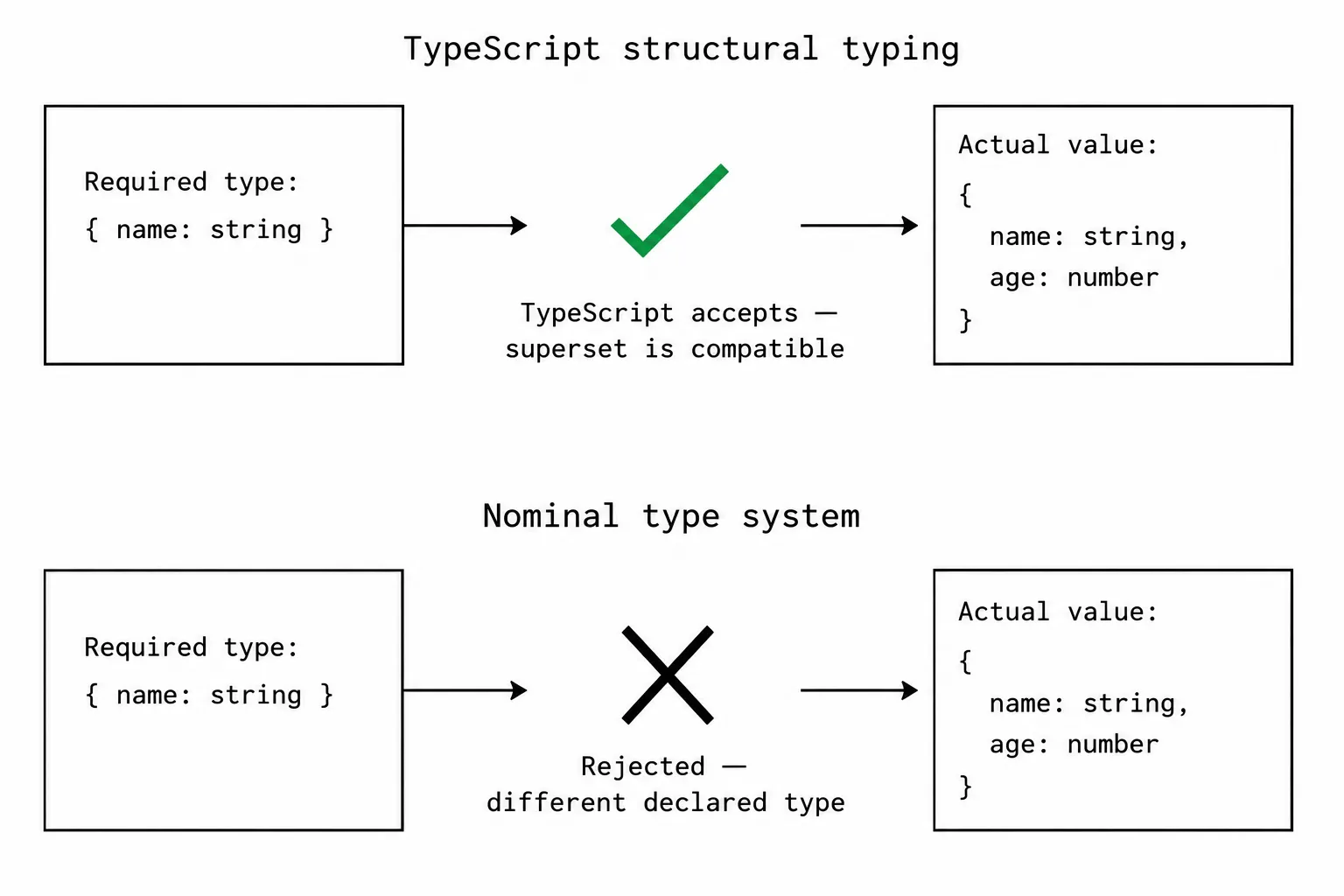
In Java, if you declare class Dog and class Cat, they’re different types even if they have the exact same fields. Two classes with the same shape are still distinct because they have different names. That’s nominal typing.
TypeScript doesn’t work that way. Two types are compatible if they have the same structure, regardless of their names.
type Dog = { name: string; age: number };type Cat = { name: string; age: number };
function greet(animal: Dog) {  console.log(`Hello, ${animal.name}`);}
const myCat: Cat = { name: "Whiskers", age: 5 };greet(myCat); // works! Cat has the same shape as Dog
This feels wrong if you’re used to nominal typing. “I asked for a Dog, not a Cat!” But TypeScript’s perspective is: the function only needs a name: string and an age: number. The Cat has both. The function will work correctly. Why should the type name matter?
This has practical consequences. You don’t need to declare that a type “implements an interface” the way you would in Java. If the shape matches, it’s compatible. This makes TypeScript much more flexible with third-party code: you can pass objects from one library to functions from another as long as the shapes align.
Where it causes trouble: sometimes two things have the same shape but are semantically different. A UserId and a ProductId might both be string, and TypeScript treats them as interchangeable. In those cases, you need the branded types pattern (covered in the advanced article).
Unions: “this OR that”
Section titled “Unions: “this OR that””A union type says “this value is one of these types.” The pipe | is the “or” operator.
type Status = "active" | "inactive" | "pending";type Id = string | number;type Result = SuccessResult | ErrorResult;The key insight: when you have a union, you can only access properties that exist on all members of the union. TypeScript doesn’t know which variant you have until you narrow it.
function formatId(id: string | number) {  // id.toUpperCase()  // error! number doesn't have toUpperCase  // id.toFixed()       // error! string doesn't have toFixed
  // You have to narrow first  if (typeof id === "string") {    return id.toUpperCase(); // now TypeScript knows it's string  }  return id.toFixed(0); // now TypeScript knows it's number}
Unions with string literals are one of TypeScript’s most useful features. Instead of accepting any string and hoping for the best, you specify exactly which strings are valid:
// Without literal types: any string is acceptedfunction setTheme(theme: string) {}setTheme("dark"); // finesetTheme("drak"); // also fine (typo, bug at runtime)
// With literal types: only valid values acceptedfunction setTheme(theme: "light" | "dark" | "system") {}setTheme("dark"); // finesetTheme("drak"); // compile error
Intersections: “this AND that”
Section titled “Intersections: “this AND that””Intersections combine types. The ampersand & is the “and” operator.
type HasName = { name: string };type HasAge = { age: number };type Person = HasName & HasAge;// Person has both name AND age
const person: Person = { name: "Alice", age: 30 };
Intersections are how you compose types from smaller pieces. Instead of one big interface with every field, you combine focused types:
type Timestamped = { createdAt: Date; updatedAt: Date };type SoftDeletable = { deletedAt: Date | null };
type User = { name: string; email: string } & Timestamped & SoftDeletable;// User has name, email, createdAt, updatedAt, deletedAt
The relationship between unions and intersections confuses people:
A | Bmeans “has the properties common to BOTH A and B” (you can only safely access shared properties)A & Bmeans “has ALL properties of BOTH A and B” (you can access everything)
Union makes the type wider (fewer guaranteed properties). Intersection makes it narrower (more guaranteed properties).
Narrowing: telling TypeScript what you know
Section titled “Narrowing: telling TypeScript what you know”When you have a union type, narrowing is the process of ruling out variants until TypeScript knows the specific type.
TypeScript understands several kinds of guards automatically:
typeof checks for primitives:
if (typeof value === "string") { /* value is string */}instanceof checks for class instances:
if (error instanceof ValidationError) { /* error is ValidationError */}in checks for property existence:
if ("swim" in animal) { /* animal has a swim property */}Equality checks against specific values:
if (status === "active") { /* status is "active", not the full union */}Truthiness eliminates null and undefined:
if (user) { /* user is not null or undefined */}Discriminated unions use a shared field to identify variants:
type Shape = { kind: "circle"; radius: number } | { kind: "square"; side: number };
function area(shape: Shape) {  switch (shape.kind) {    case "circle":      return Math.PI * shape.radius ** 2;    case "square":      return shape.side ** 2;  }}
The kind field is the discriminant. Each variant has a unique value for kind, so checking it tells TypeScript exactly which variant you have.
Try it: narrowing in action
Section titled “Try it: narrowing in action”This demo shows different narrowing patterns. Pick one, then click each guard to see how the type narrows.
The thing to notice: TypeScript doesn’t just know what the type IS after a guard. It also knows what the type ISN’T. The else branch gets the complement. If you checked for string, the else branch is number (everything that wasn’t eliminated).
never: the impossible type
Section titled “never: the impossible type”If you narrow a union until no variants remain, the type becomes never. This is useful for exhaustiveness checking:
type Shape = { kind: "circle"; radius: number } | { kind: "square"; side: number };
function area(shape: Shape): number {  switch (shape.kind) {    case "circle":      return Math.PI * shape.radius ** 2;    case "square":      return shape.side ** 2;    default:      // shape is 'never' here because all variants are handled      const _exhaustive: never = shape;      return _exhaustive;  }}
If someone later adds a triangle variant to the union, the default case gets a compile error because shape is no longer never there (it could be the unhandled triangle). This forces you to handle the new variant. You don’t find out at runtime that you forgot a case.
Type aliases vs interfaces
Section titled “Type aliases vs interfaces”Both define object shapes. The community spent years arguing about which to use. The practical differences:
// Interface: can be extended, can be mergedinterface User {  name: string;  email: string;}interface User {  age: number; // declaration merging: User now has name, email, and age}
// Type alias: can't be merged, but can express unions, intersections, mapped typestype Status = "active" | "inactive"; // interface can't do thistype Response = SuccessData & Timestamped; // interface can't do this easily
My rule: use type for everything unless you’re writing a library where declaration merging matters (rare). Types are more flexible and the syntax is more consistent. The React community has largely converged on this too.
Interview angles
Section titled “Interview angles”“Explain structural vs nominal typing.” TypeScript uses structural typing: two types are compatible if their shapes match, regardless of names. This makes the type system more flexible than Java/C# (you don’t need explicit implements declarations) but means two semantically different types with the same shape are interchangeable.
“What are discriminated unions?” A union where every variant has a shared field (the discriminant) with a unique literal value. Checking the discriminant narrows the type to the specific variant. Combined with exhaustiveness checking, they ensure every variant is handled. They’re the TypeScript equivalent of algebraic data types in Haskell/Rust.
“When does TypeScript narrowing fail?” When the type guard and the actual runtime value disagree. Type assertions (as) bypass narrowing. Mutable variables can change between the check and the usage (closures captured in callbacks). And TypeScript can’t narrow through indirection (calling a function that returns whether the type is X).